Running Local LLMs for Coding
I’ve tried running models locally before and always came away thinking it was a neat demo and not much else. Too small, too slow, too forgetful to actually lean on. The coding assistants I lean on at work are the cloud ones, Claude, Codex, and Copilot, paid for by my employer. They’re great, but too expensive for my personal side projects.
I went back and tried it again today, and that’s not the story anymore. With one consumer GPU I ran a solid model entirely on my own hardware, hooked it into a real coding agent, and had it build a working web app from an empty folder. Nothing left my network. No API bill. And it ran at around 180 tokens per second, which works out to roughly 8,000 words a minute. The text streams by faster than you can read it.
Here’s exactly what I did, so you can copy it. I’ll explain the pieces as I go in case you’re newer to this.
What I’m running
- GPU: NVIDIA RTX 5090. This is the part that matters. It’s a retail card, not a data center part. It lives in my Windows desktop.
- Runner: LM Studio, a desktop app that downloads models and serves them over a local API.
- Model: Qwen3.6 35B A3B. It’s a mixture-of-experts model, which is where the speed comes from. 35 billion parameters total, but only about 3 billion fire per token, so you get a big model’s knowledge at a small model’s speed.
- Agent: opencode, a coding agent that runs in the terminal. I run this on my laptop and point it at the desktop.
Personally, I’d rather work on a Mac or Linux machine. I can use WSL on the Windows box, but it’s a bit of a hassle, so I leave the GPU machine where it is and just drive it over the network from my laptop instead.
Step 1: LM Studio on Windows
LM Studio is the easy way in. It’s a normal app, so you’re not fighting the command line just to get a model running.
Install and grab a model
I downloaded LM Studio from lmstudio.ai and installed it like anything else. Then I opened the model search inside the app and pulled down Qwen3.6 35B A3B. LM Studio finds the file, picks a reasonable quantization, and stores it for you.
Start the server
LM Studio can act as a local API server that speaks the same protocol as the big cloud providers. It serves both OpenAI-compatible and Anthropic-compatible endpoints, which is what lets other tools talk to it like it’s a paid API.
I went to the Developer tab, turned on the local server, and hit Load Model so it was sitting in memory ready to answer. By default it listens on port 1234.
One setting worth changing when you load the model: bump the context length up to 200000. Coding agents chew through context fast, since they’re feeding the model your files, command output, and the running conversation, and the default window is usually way too small for that. 200000 gives it plenty of room to work.
Open it to the local network
At this point the server is up and working, and if you’re happy coding on the same Windows machine you could point opencode at it right now and skip this whole section. I’d rather work from my Mac, so first I needed to make the server reachable from other devices on my network.
Out of the box the server only listens on 127.0.0.1, which is loopback. That means “this machine only,” and it rejects anything coming from another computer. I wanted to drive it from my laptop, so I had to expose it to my home network. Two parts, and the order matters.
Bind to all interfaces. In LM Studio’s settings I flipped on the Serve on Local Network toggle. That switches the bind address from 127.0.0.1:1234 (loopback only) to 0.0.0.0:1234 (all interfaces).
I checked it in PowerShell:
netstat -ano | findstr :1234
If it’s working you’ll see 0.0.0.0:1234 ... LISTENING. If it still says 127.0.0.1:1234, the toggle didn’t take.
Add a firewall rule. Even bound to 0.0.0.0, Windows Defender Firewall blocks inbound connections on real network interfaces by default. I opened PowerShell as Administrator (right click, Run as administrator, since a normal session just gives you “Access is denied”) and ran:
New-NetFirewallRule -DisplayName "Port 1234" -Direction Inbound -LocalPort 1234 -Protocol TCP -Action Allow
One related gotcha: your network profile needs to be Private, not Public. Public blocks most inbound traffic, so even a correct firewall rule won’t help.
Test from another machine. From my laptop, not the host, I hit it:
curl http://x.x.x.x:1234/v1/models
Swap x.x.x.x for your host’s actual LAN address (ipconfig | findstr IPv4 will tell you). If you get a list of models back, you’re good.
Step 2: Point opencode at LM Studio
opencode is a coding agent that lives in your terminal. It reads and writes files, runs commands, and works through a task on its own. It usually points at a cloud model. I pointed it at mine.
It supports custom providers through an OpenAI-compatible adapter, and LM Studio exposes exactly that kind of endpoint at /v1, so they line up nicely.
First I confirmed the server was reachable and saw what was loaded:
curl -s http://x.x.x.x:1234/v1/models
That listed my available models, including qwen/qwen3.6-35b-a3b. Then I added a provider block to opencode’s global config at ~/.config/opencode/opencode.json:
"provider": {
  "lmstudio": {
    "npm": "@ai-sdk/openai-compatible",
    "name": "LM Studio",
    "options": {
      "baseURL": "http://x.x.x.x:1234/v1",
      "apiKey": "lm-studio"
    },
    "models": {
      "qwen/qwen3.6-35b-a3b": {
        "name": "Qwen3.6 35B A3B"
      }
    }
  }
}
Couple of things I ran into:
- The
apiKeyis a throwaway. LM Studio ignores it, but the adapter wants the field to exist, so put anything there. - This is the global config, so it applies to every project. If you’d rather keep it to one project, drop the same block into a project-level
opencode.jsoninstead. - Make sure the model you pick is actually loaded in LM Studio. With just-in-time loading on it’ll load on first request, otherwise load it yourself from the Developer tab.
After that I ran opencode, typed /models, and picked the LM Studio entry. You can also set a default in the config with "model": "lmstudio/qwen/qwen3.6-35b-a3b". From there opencode behaves exactly like it would with a cloud model, except every token comes off the GPU in the next room.
Step 3: Actually building something
Tokens per second is an abstract number, so let me show you what it felt like. I had opencode, running fully on the local model, build me a web app, and I let it do the work.
I started simple:
Help me create a deno server that serves a simple web page.
It treated this as a real task and just did it. It created two files in my empty folder, a server.ts running a Deno HTTP server on port 8000 and a basic index.html that said “Hello from Deno,” and told me how to run it.
Then I told it to run the thing itself:
you try to run it
This is the part that sold me. It ran the server and immediately hit an error:
error: Uncaught (in promise) TypeError: server is not async iterable
The Deno serving API had changed out from under the pattern it first reached for. It didn’t get stuck. It read the error, rewrote the code to use the current Deno.serve() API with an async handler, ran it again, hit the endpoint with curl to confirm it was serving, and shut it back down. Hit an error, understand it, fix it, verify the fix. That loop is the whole difference between a real agent and fancy autocomplete, and it was all happening on my own machine.
Then I made it harder:
You are a web developer and you are competing in a hackathon. In order to win, you will need to come up with an elaborate design for this page. Update the CSS and add javascript if necessary to come up with a new page that will be sure to impress the judges.
It first tried to hand the job off to a sub agent, so I cut that off:
do not use subagents for this
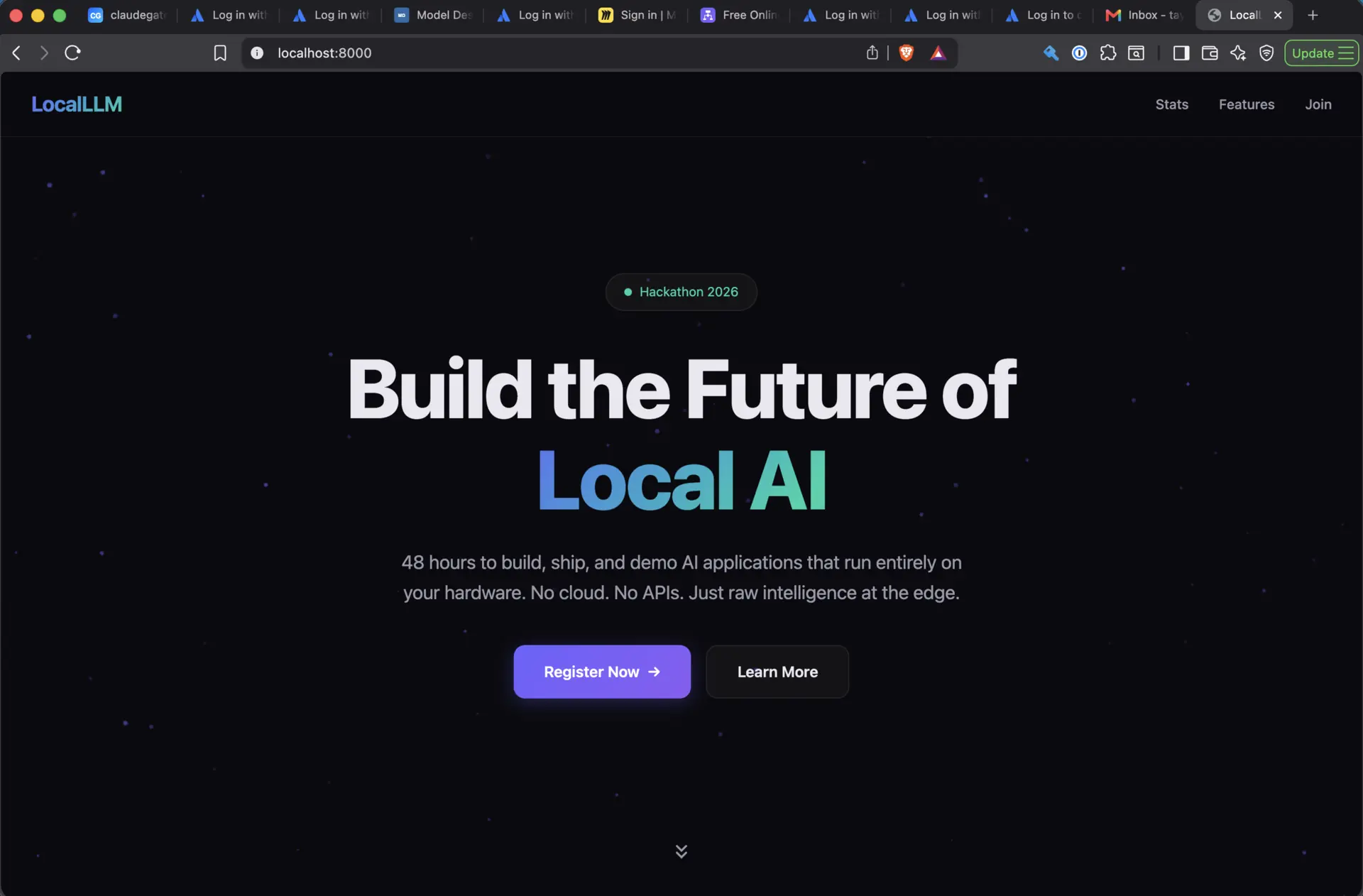
And it wrote the whole thing itself, a full redesign with inline CSS and JavaScript, no external dependencies. What it came back with:
- An animated particle network background on a canvas, zero libraries
- A gradient hero section with animated gradient text, a badge with a pulsing dot, and CTA buttons
- Stat counters (48 hours, 500 developers, $50K in prizes, 100% offline) that count up as you scroll to them
- Feature cards with hover lift effects and gradient top borders
- A glassmorphism look with backdrop blur, transparency, and subtle borders
- Scroll reveal animations using an IntersectionObserver
- A responsive layout from desktop down to mobile
- A navbar that shrinks and blurs on scroll
- Smooth scrolling, dark theme, purple/teal/pink accents
The result was a genuinely sharp hackathon landing page. Dark hero reading “Build the Future of Local AI” with a gradient on the key phrase, clean nav, tasteful animated background, the kind of thing I wouldn’t be embarrassed to submit. From empty folder to that finished page took only a few short rounds of back and forth, less than 10 minutes start to finish.
At 180 tokens per second it was writing code faster than I could read it, and I never left my own network to do any of it.
Step 4: It can hit the web too
Coding is one thing. I wanted to see if it could handle something that needs fresh, real-world info, the kind of thing people assume only a cloud model can do. So I asked:
Search the web to tell me what happened in the US stock market on June 18, 2026.
Through opencode’s web tooling, the local model came back fast with a clean summary. It led with all three major indexes closing higher, rebounding from the previous day’s selloff after the Fed’s hawkish pause under new Chair Kevin Warsh, and laid the closes out in a table:
| Index | Close | Change |
|---|---|---|
| Dow Jones | 51,564.70 | +72.15 (+0.14%) |
| S&P 500 | 7,500.58 | +80.48 (+1.08%) |
| Nasdaq Composite | 26,517.93 | +496.28 (+1.91%) |
| Russell 2000 | 2,979.77 | +61.78 (+2.1%) |
Then it gave the actual drivers: a US/Iran memorandum reopening the Strait of Hormuz and pushing oil down, a semiconductor rally led by Intel up about 10.5% on an Apple chip partnership, the Fed dot plot showing nine of eighteen policymakers now expecting a hike, Accenture down 18% on a weak forecast, and markets closed the next day for Juneteenth.
I actually went and checked those numbers against real financial reporting, and they hold up. The index closes, the Fed details, the Intel move, the Accenture drop, the Iran deal, the Juneteenth closure, all of it matches what actually happened. This wasn’t a confident hallucination. It was a correct, current, sourced answer, off a model running on my desk.
Is it worth it?
So it seems like a single consumer GPU is now enough to run a coding agent that does decent work. Not toy work. It scaffolded a project, hit a real breaking API change and fixed it itself, designed a polished front end, and pulled accurate live info off the web.
What you give up is real but smaller than it used to be. The top cloud models are still ahead on the hardest, gnarliest problems. Sonnet 4.6 is probably still a bit better than this local setup, Opus 4.8 blows it out of the water, and Fable 5 is somehow another leap beyond that (though at the current time of writing, Fable is not available.) And there’s the upfront cost. A 5090 isn’t cheap. Though, if you were buying one (or already had one) anyway the coding assistant is basically free after that.
What you get is the rest of it. Everything stays on my machine, which matters a lot for code I can’t send to a third party. No per-token bill, so I can be as wasteful and exploratory as I want. It keeps working if my internet drops. And it’s just satisfying to watch something this capable run on hardware I own with nothing phoning home.
A year ago I’d have called local models a hobby. Now, for a big chunk of day-to-day coding, they’re a real tool. If you’ve got the GPU, try it.
What I’m trying next
This was mostly a proof of concept to see if the setup was viable. It is, so now I want to actually fold it into everyday use. Two things I’m going to try next:
- Using natural language to easily run everyday commands and tasks, like having it generate SQL from a plain-English description of what I want instead of writing the query by hand.
- Building a real application with some actual complexity, not just a landing page, and seeing where the local model starts to strain.